How to Use a Lead Generation Chatbot on Your Website
A practical guide to running a lead generation chatbot: when to ask for contact details, which fields to ask for, and how fast to follow up.
Most website visitors leave without saying a word. They read a page, maybe two, and close the tab. A contact form at the bottom of the page asks them to do work before they get anything back, so most of them never fill it in.
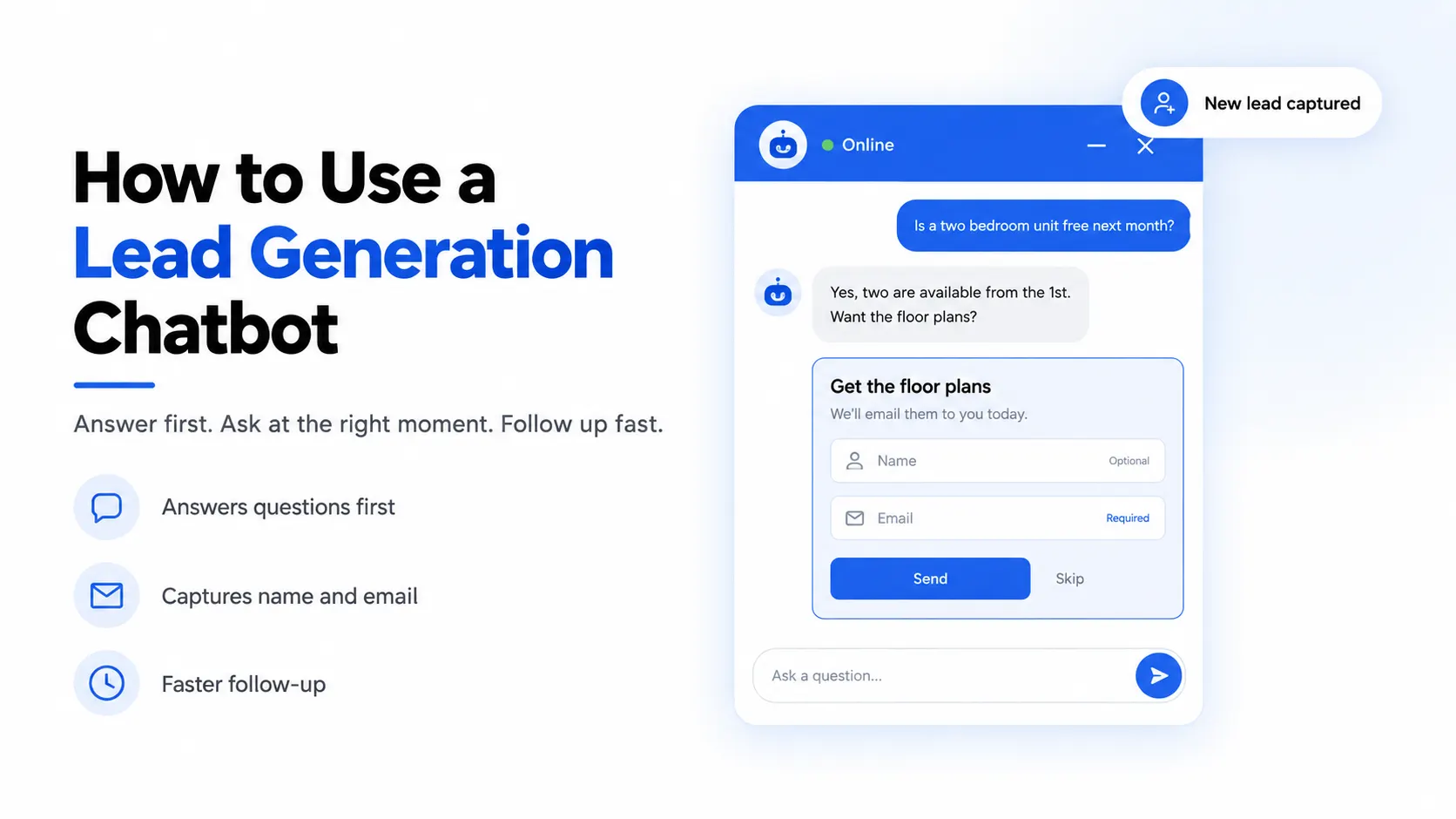
A lead generation chatbot flips that order. It answers the visitor's question first, right on the page, and asks for a name and email once the visitor has a reason to give them. This guide covers how that works in practice: when to ask, which fields to ask for, how to handle consent, how fast to follow up, and how to tell whether it is working.
What a lead generation chatbot actually does
A lead generation chatbot is a chat window on your website that does two jobs. It answers visitor questions, and it collects contact details from the people who are likely to buy. The contact details land in a list your team can work through, with the conversation attached so you know what each person wanted.
What is a lead generation bot?
A lead generation bot is the same thing under a shorter name. The older kind followed a fixed script: a row of buttons, a few canned questions, then a form. The newer kind is an AI chatbot trained on your own content, so it can answer real questions in plain language before it asks for anything.
Someone asking "how much is a two bedroom unit?" wants an answer, not a menu. Answer well, and they are more willing to leave an email. You can see how an AI bot learns your pages and files in our guide to how you train a chatbot on your own data.
Bot lead generation vs a contact form
A contact form and a chatbot both end with a name and an email. The difference is what happens before that point.
| Question | Contact form | Lead generation chatbot |
|---|---|---|
| When does the visitor get help? | After someone on your team replies | Right away, in the chat |
| What do you learn about the lead? | Whatever they typed in a message box | The full conversation, including the exact questions they asked |
| When is the ask made? | Always, before any help | At a moment you choose |
| What if they do not want to share details? | They leave | They can skip and keep chatting |
When a lead generation chatbot should ask for contact details
Timing is the biggest decision you will make. Ask too early and you are a popup with extra steps. Ask too late and the visitor has already left.
Timing options for a website chatbot for lead generation
In EmbedMyBot, the lead form has three trigger settings, and each suits a different kind of site:
- Always (on open). The form shows as soon as the visitor opens the chat. Use this when you cannot help anyone without knowing who they are, such as a booking line where every request needs a callback.
- After N messages. The form shows after the visitor has sent a set number of messages, anywhere from 1 to 10. This is the safe default for most sites. Two or three messages in, the visitor has had real answers and is more likely to share an email.
- AI decides. You tell the bot, in its instructions, when to bring up the form. For example: "Offer the contact form when someone asks about pricing for more than 10 users, or asks to book a viewing." The form appears at that point in the conversation, not at a fixed count.
Whichever you pick, visitors can tap Skip and carry on chatting. A visitor who skips and gets a good answer may still come back.
How chatbots handle lead generation timing on different pages
On a blog post, visitors are researching, so a later trigger works better. On a pricing or booking page, an earlier ask is reasonable. Separate bots for different parts of your site can each have their own timing. A leasing site is a good example: someone asking about pet policy can wait, but someone asking whether a unit is free next month is ready to talk now. Our page on the real estate chatbot shows how that plays out for property teams.
You can also nudge visitors who never open the chat. A proactive message shows a short teaser bubble after a delay you set, such as "Questions about availability? Ask here."
What fields to ask for
Every field you add is one more reason to skip. Start with the least you need to follow up, then add fields only when you know you will use them.
EmbedMyBot's lead form offers four fields: name, email, phone and company. You can switch each one on or off and mark it as required or optional. Out of the box, name and email are on, with email required, and phone and company are off.
Email capture chatbot: when email alone is enough
For most businesses, email is the only field that has to be required. It lets you send a quote or a reply to the question the bot could not answer. Leave name on but optional. If you sell to businesses, company helps you sort leads, but keep it optional too.
A simple rule: if nobody on your team would act on a field within a week, do not ask for it.
When a lead bot should ask for a phone number
Ask for a phone number when your sales process actually runs on calls: home services, clinics, car dealers, property viewings. In those cases a phone number is worth more than an email, and visitors expect to be asked. For everyone else, a required phone field tends to look like a sales call is coming, and people skip it.
Write the form text yourself. You can set the form title, a short description and the success message. Use the description to say what happens next, for example "Leave your email and we will send the full price list today." A clear promise does more than a generic "Stay in touch."
Consent and privacy
Collecting contact details means you are collecting personal data, so treat it with care. If you have visitors in the EU or the UK, the GDPR applies. One of its core principles, in Article 5, is data minimisation: personal data must be "adequate, relevant and limited to what is necessary" for the purpose you collect it for. That is one more reason to keep your form short.
Practical steps that cost you nothing:
- Say in the form description what you will use the details for, and keep to it.
- Link to your privacy policy from your site, and make sure it covers chat data.
- Do not add visitors to a newsletter just because they asked the bot a question. If you want to market to them, ask for that separately.
- Delete leads you no longer need. In the EmbedMyBot dashboard you can delete a lead at any time.
This is general guidance, not legal advice. If you work in a regulated field such as healthcare or finance, check with someone who knows the rules in your country.
Follow-up speed: where most leads are lost
Capturing a lead is half the job. The other half is replying before interest fades.
Research published in Harvard Business Review, "The Short Life of Online Sales Leads," audited 2,241 US companies by sending each one a web lead and timing the response. Only 37% replied within an hour, 23% never replied at all, and the average response time among those that did reply within 30 days was 42 hours. The same study found that firms that tried to contact a lead within an hour were nearly seven times as likely to qualify it as firms that waited even an hour longer, and more than 60 times as likely as firms that waited 24 hours or more.
The study is from 2011, but the lesson has not aged: the lead is warmest while the visitor still remembers why they asked.
A chat bot for leads only works if someone replies
The chatbot buys you time, because the visitor already got answers during the chat. It does not replace the follow-up. Set up a routine your team can keep:
- 01Check the Leads view at fixed times each day, such as 10am and 3pm. New leads arrive with the status "new."
- 02Read the conversation before you reply. If the visitor asked about weekend delivery, open with weekend delivery.
- 03Move each lead to "contacted" once you reply, then to "qualified" or "lost." Add a note so a teammate can pick it up.
- 04Export the list as a CSV if your sales team works in another tool.
Some visitors want a person right now, not an email tomorrow. For them, turn on human handoff, which shows a teammate card and lets the visitor reach you by WhatsApp, email or phone when they ask for a human or the bot reaches the limit of what it knows.
Recent buyer research backs up having both. In a Gartner survey of 645 B2B buyers, 67% said they prefer a sales rep-free experience, yet 69% said they turn to sales reps to validate AI-generated insights. People want to help themselves first and talk to a person at the moment of decision. A good chatbot setup gives them both, in that order.
How to create a lead generation bot
You do not need a developer to set this up. Here is the order we suggest.
Create a lead generation bot step by step
- 01Train it on the pages that sell. Add your pricing, services, delivery or booking pages, and your FAQ. The bot can only earn trust if its answers are right.
- 02Turn on lead capture. In the widget settings, open the Leads tab and switch on lead capture.
- 03Pick a trigger. Start with "After N messages" set to 2 or 3. Change it later once you have data.
- 04Choose fields. Email required, name optional. Add phone only if you follow up by phone.
- 05Write the form text. A title, a one line promise of what happens next, and a success message.
- 06Embed it and test. Paste the one-line script on your site, ask the bot three questions yourself, and check that your test lead shows up in the dashboard.
The full list of settings is in the lead capture docs.
What the best chatbot for lead generation needs
Whatever tool you use, look for these basics before you commit:
- Answers from your own content. A bot that guesses will lose the lead before the form appears.
- Control over timing. You should decide when the form shows, not the tool.
- A skip option. Visitors who say no should still get help.
- The conversation saved with the lead. Without it, your follow-up starts from zero.
- Lead capture on the plan you can afford. Check which plan includes it before you build around it.
Choosing a lead capture chatbot builder
EmbedMyBot covers all five, and lead capture is included on every plan, including Free. If you want the product side of this, with examples of the form in action, see our lead generation chatbot page. This guide is about the method, and the method works the same whichever plan you start on.
Measuring whether your lead generation chatbot works
Give it two to four weeks, then look at three numbers.
- Leads per conversation. Divide leads captured by conversations started. If it is very low, the form may be showing too late, or the bot may be failing to answer the questions that come before it.
- Leads that become customers. Use the statuses in the Leads view. A high lead count with almost nothing marked "qualified" usually means the form is showing too early and catching people who were only browsing.
- Questions the bot could not answer. Every unanswered question is a visitor who might have become a lead. Fix the gaps in your training content first.
Your EmbedMyBot dashboard shows conversations, leads, top questions, response time, CSAT and busiest hours. Our page on chatbot analytics covers what each of these tells you, and the post on what to check first gives a five minute weekly routine.
If your site runs Google Analytics 4 or Google Tag Manager, the widget sends a chatbot_lead event each time a lead is captured, with no setup on your side. Google's own GA4 help says any event you collect can become a key event, so mark chatbot_lead as one. You can then see which traffic sources send visitors who go on to leave their details, right next to your other conversions.
Start small and adjust
Train the bot on your key pages, ask for an email after two or three messages, reply within the hour, and check the numbers after a few weeks. Then change one thing at a time.
Lead capture is on every EmbedMyBot plan, including the free one, so you can test this on your own site before you pay anything. See the plans and limits on our pricing page.